Most of what goes wrong in a growing store is not a tool problem. It is a "whose job was that?" problem.
A late purchase order. An order stuck for four days. A developer change nobody tested. In each case the information existed. It just lived in someone's inbox or someone's head.
This post walks through an operations setup plan I put together for an apparel brand. It is a plan, not a results report, so I'll show how it is built, what each part is meant to fix, and the targets I'd measure it against.
Table of contents
The problem: work with no single home
A small ecommerce brand has more moving groups than it looks. Founders, customer service, marketing, a 3PL, manufacturers and developers all need things from each other.
Without a structure, each of them talks to the founder directly. The founder becomes the project manager, usually without meaning to.
Tasks get agreed in a call and never written down. Two people think the other one is handling it. Problems surface on the deadline, not before it.
The fix is project management, applied to operations. One person keeps projects, people and processes moving, and everything else is arranged around that.
How the setup is put together
The plan has four parts: a hub, a small set of tools, a few workflows, and a weekly rhythm.
Part 1: one hub, six groups
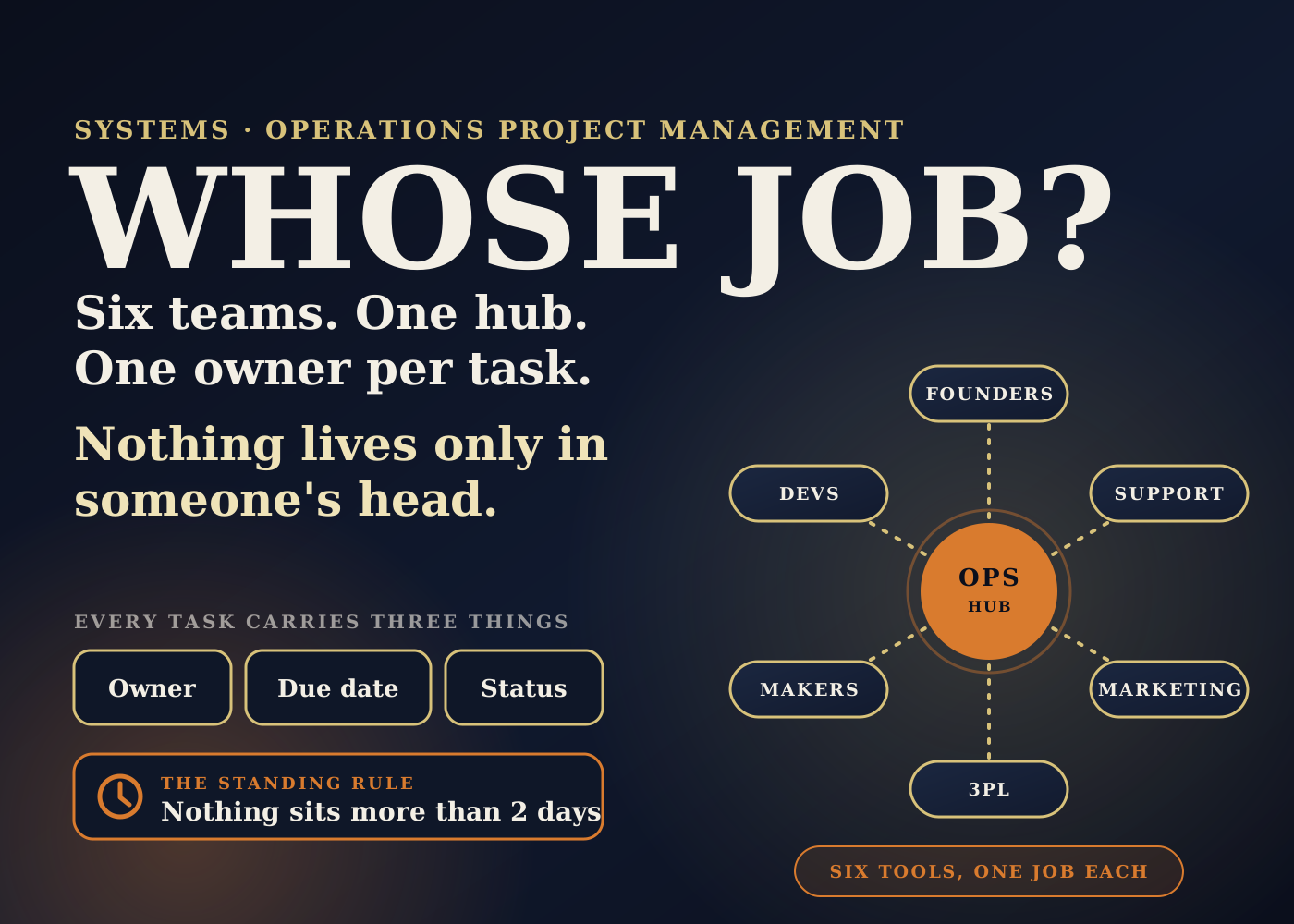
The operations manager sits in the middle. Each group gets one clear way of working with ops.
Founders get decisions brought to them with the options and costs laid out. Customer service tags tickets by issue type, and those tags turn into weekly action items.
Marketing hears what customers are saying every week, straight from the support data. Fulfillment and the 3PL work from a daily exceptions list, with each item followed up until it is closed.
Manufacturers get a check-in a few days before each purchase order milestone, not after it is missed. Developers get written briefs with clear "done" criteria, and their work is tested before sign-off.
Part 2: six tools, each with one job
The rule here is to start with what the brand already uses and only add something when there is a gap.
Where we talk: Slack. A handful of channels by topic, such as order exceptions, inventory, launches, support trends and decisions. Slack Connect brings the 3PL and developers into the same place. Slack's help pages say Slack Connect channels need each organization to be on a paid plan, so check that with your partners first.
Who does what, by when: a task tool. Whatever the brand uses now. If nothing yet, Asana, or Notion so there is one less tool.
The numbers: Google Sheets. An inventory master, a PO tracker, an exceptions tracker and a weekly support trends sheet.
How we do things: Notion. An operations handbook with one page per SOP. Each page has an owner, a status, a last-reviewed date and a short Loom walkthrough.
Moving data and sending alerts: Shopify Flow and Apps Script. Problem orders go into the tracker on their own. Low-stock and PO reminders go out on time. Google's documentation says time-driven Apps Script triggers can run as often as every minute or as rarely as once a month, which is plenty for a daily check. Zapier or Make come in only if needed.
Reports and first drafts: Claude. It pulls from Shopify, Sheets, Slack and Notion to draft reports. It is connected only with the founders' approval, and every output is checked by a person before it is used.
Part 3: four workflows
Automation handles the handoffs and reminders. People handle the judgment calls.
Order exceptions. An order gets a problem tag, such as address, out of stock, edit or return. It is added to the exceptions tracker and the owner gets an alert. Both steps are automatic. The owner works it until it is closed, and the open list rolls into the Friday founder update.
Inventory. Shopify and 3PL counts are pulled daily and days of cover is calculated for every SKU. An alert goes out when days of cover falls below lead time. The numbers are checked, reorder options are laid out, and the founders approve or adjust.
Purchase orders. Milestones are logged: sample, production, QC, ship. A reminder goes out a few days before each date. Ops checks in with the manufacturer before the date, and any delay goes to the founders with options and costs.
SOP updates. The process is agreed with the people who run it. The page is drafted in the handbook, a Loom walkthrough is added, the team gets the link, and the page is reviewed monthly against what actually happens.
Part 4: the weekly rhythm
Monday, a priorities post in Slack with the week's tasks and owners. Tuesday to Thursday, hands-on work: fixes, launches, supplier follow-ups and chasing blockers.
Every day, a ten-minute exceptions check. The overdue list arrives first, so the check stays short. Inventory alerts and PO reminders run automatically, and only what needs action shows up.
Friday, a founder update: done, next, blocked, and decisions needed. Monthly, an SOP review and a 3PL reconciliation, where 3PL counts are compared with Shopify and expected stock.
What it solves
Unowned work. Every task sits in one shared tracker with one owner, a due date and a status. This is the same idea as the "Accountable" role in a RACI chart. Asana's guide to RACI puts it as only one person being accountable for each task.
The founder as bottleneck. Founders stop being the message relay. They get one update on Friday and one channel for decisions.
Late surprises. Reminders fire before a PO date, not after. Stock alerts fire when cover drops below lead time, not when the product is gone.
Knowledge in one head. Processes are written down with an owner and a review date. A new hire, or a covering teammate, has somewhere to look.
Tool sprawl. Six tools with one job each is easier to run than twelve tools that overlap. Nothing new gets added without a gap the current tools can't cover.
The effect on the business, and how to measure it
I won't quote results for this plan. It is a setup plan, and I don't publish client numbers I can't show. What I can share are the targets written into it, because a system without a target can't be judged.
Order exceptions: no order unshipped past 48 hours without a named owner.
Inventory: always know what is sellable, and catch stock problems early.
Purchase orders: no surprise delays from the factory.
SOPs: every process written down, owned and current.
Across everything: nothing sits for more than two days. Stuck work gets chased, then escalated.
Each of those can be counted. Orders over 48 hours with no owner. Stockouts that had no alert first. PO dates missed without a warning. SOP pages past their review date. Tasks idle for more than two days.
If I were the founder, I'd ask for those five counts in the Friday update. If they trend toward zero, the setup is working. If they don't, you know which workflow to look at.
The bigger picture: ground rules matter more than tools
The plan ends with four ground rules, and I think they do more work than any of the tools.
Leadership calls go to the founders. Anything that spends money, changes priorities or affects many customers comes to them with options.
AI is used only with the founders' OK, and every output is checked before it is used. I wrote more about where I draw that line in where AI actually helps run a Shopify backend.
Problems are flagged early. If something is slipping, the founders hear before the deadline, not after.
And the brand's own tools come first. No new subscriptions until there is a gap.
The order-exceptions workflow in this plan is the same idea I broke down in detail in the order-to-fulfillment system I'd build first. The purchase order side connects to Shopify's purchase order reports.
Rollout checklist
- Week 1: get access, meet every group, and list the tools already in use and what works.
- Week 1: audit orders, SKUs and customer issues to find where work is actually getting stuck.
- Weeks 2 to 3: set up the exceptions tracker and the Slack channels.
- Weeks 2 to 3: create the Notion SOP hub and write the first few SOPs, each with an owner and a review date.
- Weeks 2 to 3: build the first Shopify Flow automations, starting with problem-order tagging.
- Weeks 2 to 3: start the Monday priorities post and the Friday founder update, and keep them going every week.
- Give every task one owner, a due date and a status. No shared ownership.
- Set the two-day rule: anything idle longer gets chased, then escalated.
- Agree which decisions go to the founders, and create one channel for them.
- Schedule the monthly SOP review and 3PL reconciliation now, so they don't depend on memory.
- Later, and only with a clear need: a helpdesk when ticket volume grows, a founder dashboard, a returns and exchanges app.
None of this is complicated. It is a short list of habits and a few automations that keep them honest. The hard part is running it every week.
Source: my own operations setup plan, with tool details checked against Slack Help Center, Slack Connect guide, Google Apps Script, installable triggers, Shopify Help Center, Shopify Flow, and Asana, RACI chart guide.
Frequently asked questions
What does an operations manager actually manage in an ecommerce brand?
In this plan, one person keeps projects, people and processes moving across six groups: founders, customer service, marketing, fulfillment and the 3PL, manufacturers, and developers.
Which tools does the setup use?
Six, each with one job: Slack for talking, a task tool for who does what by when, Google Sheets for the numbers, Notion for SOPs, Shopify Flow and Apps Script for moving data and sending alerts, and Claude for reports and first drafts that a person checks.
How long does the rollout take?
The plan uses week 1 to learn and audit, and weeks 2 to 3 to fill the biggest gaps: the exceptions tracker, Slack channels, the SOP hub, the first Flow automations, and the Monday and Friday updates. Other tools are added later only if needed.
How do I know if it is working?
Count against the targets. Orders unshipped past 48 hours with no owner, stock problems with no prior alert, PO dates missed without warning, SOP pages past review, and tasks idle more than two days. Those counts should trend toward zero.