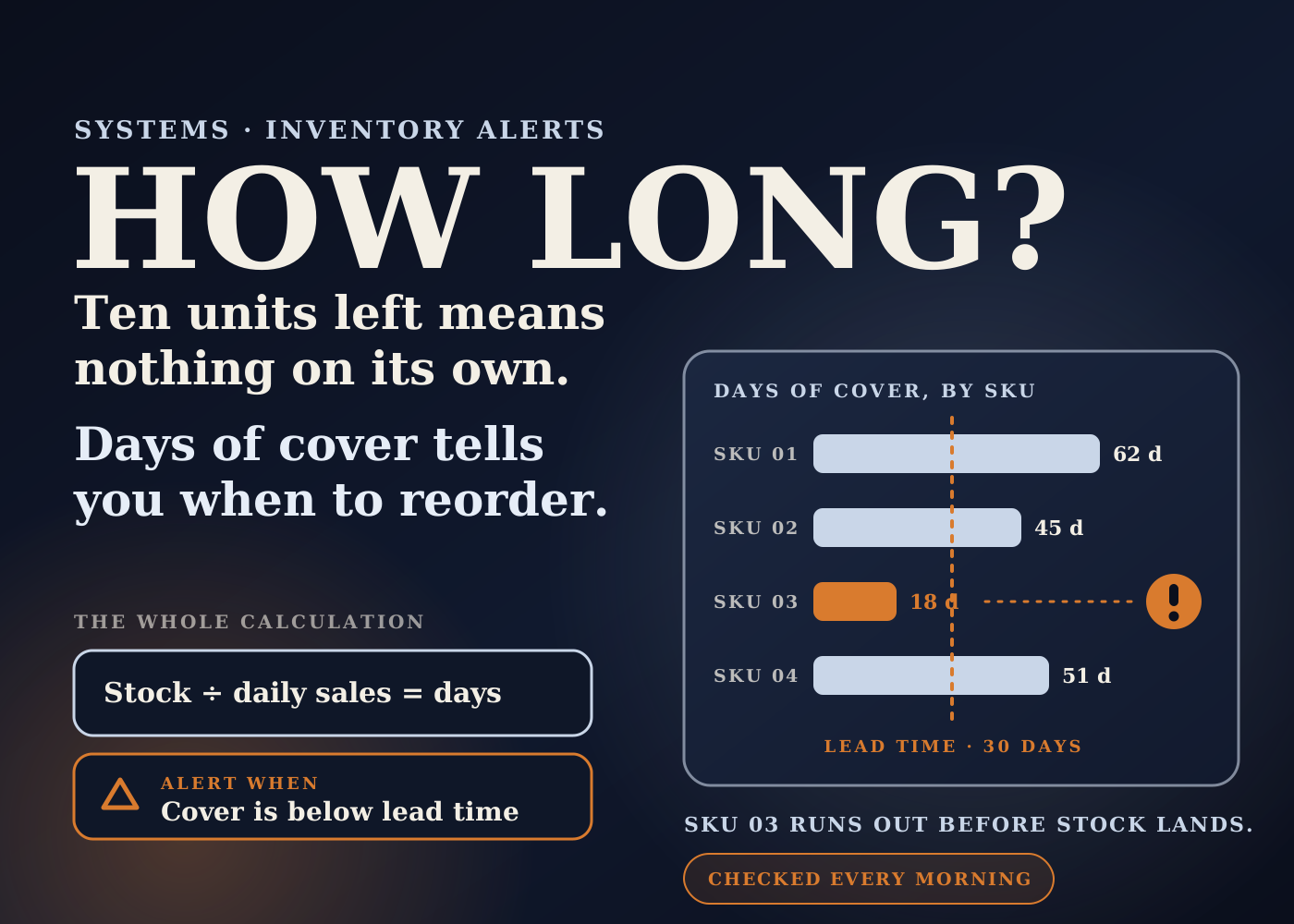
Most low-stock alerts ask the wrong question. They ask "how many units are left?" when the useful question is "how long will they last?"
Ten units is three months of stock for a slow SKU. For a bestseller it is gone by lunch.
This post walks through the inventory alert I'd build for a small Shopify brand: a Google Sheet that works out days of cover for every SKU each morning and emails the ones that will run out before a reorder can arrive.
Table of contents
The problem: unit thresholds don't know your lead time
The usual setup is a fixed number. "Tell me when any variant drops below 10."
That number ignores two things: how fast the SKU sells, and how long the supplier takes to deliver more.
So the alert fires too early for slow products and people learn to ignore it. Then it fires too late for the fast ones, and the first real warning is a sold-out product page.
By that point the choices are bad. Pay for rush freight, or sit out of stock for the length of the lead time.
How the system is put together
It has five parts: the tools, the sheet, the maths, the daily job, and the people.
Part 1: four tools, one job each
Shopify is the source of truth for stock and sales. Google Sheets holds the inventory master. Apps Script runs the daily check. Email carries the alert.
No new subscription. This is the inventory workflow from my operations setup plan, built out.
Part 2: the sheet
Four tabs. Stock: one row per SKU with available and incoming units. Sales: units sold per SKU over the last 30 days.
Settings: lead time in days for each SKU, plus a safety buffer in days. Alerts: a log of every alert sent, with the date, the SKU and what was decided.
Lead time is the one field a machine can't fill in. Shopify's own inventory guide defines it as the time in days a supplier takes to fulfill an order and deliver the goods. Someone has to ask the supplier and keep it current.
Part 3: the maths
Average daily sales is units sold divided by the number of days in the period. That is how Shopify's guide defines it too.
Days of cover = available units ÷ average daily sales.
Alert when days of cover is less than lead time plus the safety buffer.
This is the standard reorder point formula written in days instead of units. Shopify's guide gives it as reorder point = (average sales rate × lead time) + safety stock. Divide everything by the daily sales rate and you get the rule above.
I prefer the days version because founders can read it. "SKU 03 has 18 days left and the factory takes 30" needs no explanation.
Part 4: the daily job
An Apps Script function runs on a time-driven trigger. Google's documentation describes these as similar to a cron job, running as often as every minute or as rarely as once a month.
One detail from the same page: the time is slightly randomized. A recurring 9 AM trigger fires somewhere between 9 and 10, then keeps that timing each day. So I'd set it an hour before anyone needs the answer.
Getting the data in. There are two ways, and I'd start with the simple one.
The manual start: Shopify's admin lets you export inventory to CSV from Products > Inventory. Shopify's help page says the "All states" format includes available, committed, incoming, unavailable and on hand quantities by location. Paste it into the Stock tab.
The automatic version: Apps Script's URL Fetch service lets a script make HTTPS requests to other applications. It can call Shopify's Admin API, where the InventoryLevel object holds the quantities of an inventory item at a specific location and requires the read_inventory access scope.
That needs a custom app on the store. Shopify's help page says custom apps are now created and managed in the Dev Dashboard, and that staff need the app development permission to do it. This is a job for the brand's developer, with the access token kept out of shared documents.
Sending the alert. Apps Script's MailApp service sends email from the script. One message a day, listing only the SKUs under the line: SKU, units available, units incoming, days of cover, lead time.
If nothing is under the line, no email goes out. If your team works in Slack, the same list can go to an inventory channel, but check Slack's own setup guide for that. I haven't verified it for this post.
If the script breaks. Google says that when a trigger fails, Apps Script sends a failure summary by email. Make sure it lands with someone who is still on the team.
Limits. Google's quota page lists 6 minutes per script execution and 20,000 URL Fetch calls a day on a consumer account. A once-a-day stock check for a small catalog sits well inside that.
Part 5: what a person does
The pull, the calculation, the email and the log are automatic. The judgment is not.
The operations manager reads the alert and checks three things. Is stock already incoming that covers the gap? Was last month's sales rate inflated by a promotion? Is the lead time in the sheet still what the supplier says?
Then the reorder options go to the founders with quantities and costs. They approve or adjust. The decision is written in the Alerts tab so the next alert for that SKU has context.
Ownership is simple. Ops owns the sheet and the lead times. Founders own the spend.
What it solves
Late warnings. The alert arrives while there is still time to reorder at normal cost.
Alert fatigue. Slow SKUs stop tripping a threshold that was never meant for them, so the alerts that do arrive get read.
Reordering from memory. The reorder conversation starts from the same numbers every time, not from whoever happened to look at the inventory page.
Lead times in someone's head. They live in the Settings tab, with one owner.
A note on Shopify Flow. Flow has a trigger called "Product variant inventory quantity changed" that fires when a variant's inventory changes from an order, a manual edit or an app. That is a good fit for a simple unit threshold. My read is that days of cover needs sales rate and lead time side by side, which is easier to keep and audit in a sheet.
The effect on the business, and how to measure it
I'm not going to quote results here. This is a build, not a case study, and I don't publish numbers I can't show.
The target in my setup plan for inventory is plain: always know what is sellable, and catch stock problems early. That is a target, not a result.
Here is where I'd expect the effect to show up, and what to write down before you start.
Stockouts. Count the SKUs that hit zero in the last 90 days, and how many days each was out.
Stockouts with no warning. After launch, count stockouts that had no alert beforehand. The aim is zero. Each one points to a wrong lead time or a missing SKU in the sheet.
Rush costs. Total what was spent on expedited freight or rush production in the same period.
Alert to decision. Track the days between an alert and an approved reorder. If that gap is longer than your safety buffer, the buffer is too small or the approval is too slow.
False alarms. Count alerts where no action was needed. A lot of them means the sales window or buffer needs adjusting.
Compare the same counts after 60 to 90 days. If they haven't moved, the sheet is not the problem. Look at how reorders get approved.
The bigger picture: an alert is only as good as its inputs
The formula is the easy part. The system stands or falls on three inputs being true: the stock count, the sales rate and the lead time.
Stock counts drift when the warehouse and Shopify disagree. Incoming stock is only useful if purchase orders are entered properly, which is why I'd pair this with Shopify's purchase order reports.
A 30-day average also has a blind spot. It doesn't know a campaign starts next week or that peak season is coming. That is a reason to keep a person in the loop, not a reason to skip the alert.
This follows the same pattern as the order-to-fulfillment system I'd build first. The machine reads everything, every day. People only see the exceptions.
Build checklist
- Write down your baseline: stockouts, days out of stock and rush costs for the last 90 days.
- Create the sheet with four tabs: Stock, Sales, Settings and Alerts.
- Ask every supplier for current lead times and enter them per SKU. Name who keeps them updated.
- Pick a safety buffer in days. Start cautious and tighten it once you trust the data.
- Start with the manual inventory CSV export for a week to prove the maths before automating.
- Add the formulas: average daily sales, days of cover, and a flag when cover is below lead time plus buffer.
- Have your developer create the custom app with read-only inventory access, and store the token safely.
- Add the Apps Script function and a daily time-driven trigger, set an hour before you need the result.
- Send the alert email to ops only at first. Add founders once the false alarms are tuned out.
- Log every alert and the decision made.
- Review the lead times and the buffer monthly, and before every peak period.
The whole thing is one sheet, one script and one habit. The habit is the part that needs an owner.
Source: tool details checked against Google Apps Script, installable triggers, Apps Script UrlFetchApp reference, Apps Script MailApp reference, Apps Script quotas, Shopify Admin API, InventoryLevel, Shopify Help Center, custom apps, Shopify Help Center, inventory CSV, Shopify Flow trigger reference, and Shopify, Safety Stock vs Reorder Point, November 23, 2023. The system design and the expected effects are my own operator view.
Frequently asked questions
What is days of cover?
Available units divided by average daily sales. It tells you how many days the current stock will last at the recent sales rate.
When should the alert fire?
When days of cover is less than the supplier's lead time plus a safety buffer in days. It is the standard reorder point formula expressed in days instead of units.
Do I need a developer to build this?
Not to start. You can paste Shopify's inventory CSV export into the sheet and run the formulas by hand. The automatic pull needs a custom app with read-only inventory access, which Shopify says is created in the Dev Dashboard, so I'd give that step to a developer.
How do I know if it is working?
Baseline your stockouts, days out of stock and rush costs first. After 60 to 90 days, compare them, and count any stockout that had no alert beforehand. That count should be zero.